 ASTERON
LIVE WORKFLOW · H-OPS AI
FAMILY OPERATIONS, CONNECTED
Family operations,
now through conversation.
Bring money, schedules, tasks, and the work of everyday family life into one place. HOMES AI understands your family's context and moves from questions to action.
Web · mobile home screen · family-level data isolation
11:38●●● 5G 36%
H-Ops AIHandles HOMES work such as lookup and approval
Spent 84,000 won at E-Mart today on stroller wheels
add_manual_cashflow

Which cost center should I use?
Shared household budget
add_manual_cashflow
Recorded KRW 84,000 under the shared household budget.
Create a deposit request too
insert_deposit_request
Created the KRW 84,000 deposit request and notified the administrator.
photo_camera
Type a message
arrow_upwardCONNECTEDASSET · BUDGET · CALENDAR
ACTION DONECreate deposit request
ONE FAMILY, ONE CONTEXT
A question becomes a record.
A record becomes the next action.
Family information entered once connects across assets, budgets, calendars, tasks, requests, and briefings.
- 01chat_bubbleSay it
- 02manage_searchConfirm context
- 03boltTake action
- 04family_restroomShare with everyone
FEATURE DEMOS
See every feature in action.
REAL PRODUCT FLOW
Actual H-Ops AI screen
This real mobile flow records cash flow from one natural-language sentence, then continues to a deposit request using the same details.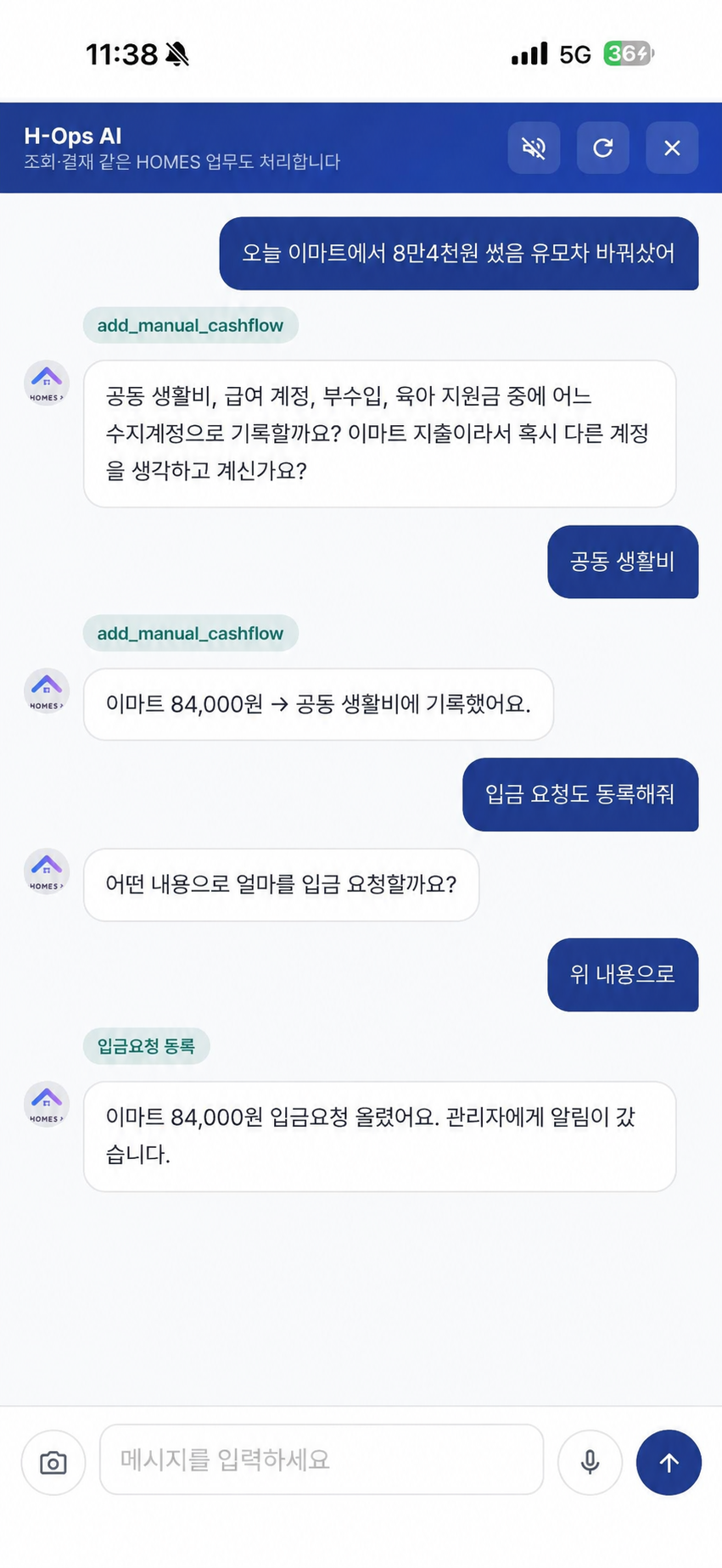
START WITH YOUR FAMILY
Start the operating system for family life.
Tell us about your family and goals, and we'll help define the right features and setup. Ask about HOMES AI ↗ Data is isolated by family, with viewing and approval scopes controlled by role.01 · CONVERSATIONAL OPS
H-Ops AI
The conversation keeps going from lookup to action.
HOMES AI understands assets, budgets, calendars, tasks, notes, and requests in the same family context. When details are unclear, it asks first and acts only after confirmation.
Record cash flowCreate deposit requestAdd tasks & eventsCheck assets & budgetsWrite shared notes
02 · ASSET OVERVIEW
Asset overview
Look beyond balances to next month's life.
Connect asset ledgers, loans, recurring income, and recurring expenses to calculate net worth and monthly savings capacity. Compare confirmed monthly snapshots with the forecast ahead.
Total & net assetsLoan balance & repaymentsMonthly asset changeCash-flow forecast
03 · LIVING BUDGET
Living budget
The moment you log spending, you see what's left.
Set monthly budgets by category and item, then compare them with actual spending. H-Ops AI understands amounts and categories from a receipt sentence or a short message.
Monthly budget setupActuals by itemManual cash flowRemaining budget
04 · FAMILY PLAN
Calendar & tasks
Align who does what and when on one screen.
Connect family calendars and tasks, with Google Calendar, external subscriptions, and CalDAV in one place. Important events and tasks continue into notifications.
Family calendarRecurring events & subscriptionsTasks by ownerPush notifications
05 · SHARED SPACE
Shared space
Keep family information from getting scattered.
Use shared notes, folder-based files, and a family album in one place. Find them again through global search or an H-Ops AI conversation.
Shared notesFamily drivePhoto albumGlobal search
06 · DAILY BRIEFING
Briefings & reports
See what matters today, first.
The family briefing combines calendars, tasks, cash flow, and request status into today's priorities. Asset changes, cost centers, and financial statements explain the numbers behind them.
Today's family briefingAsset change analysisCost-center statusFinancial statements