Where did I leave off?
When a conversation drops or a window closes, what you asked and how far it got are scattered. You spend time explaining the same thing again.
Delegate to AI. Follow through in one place. The app checks completion. You make the important decisions.
Look over the project and tell me where it stands
Project review is complete. Tell me what to do next.
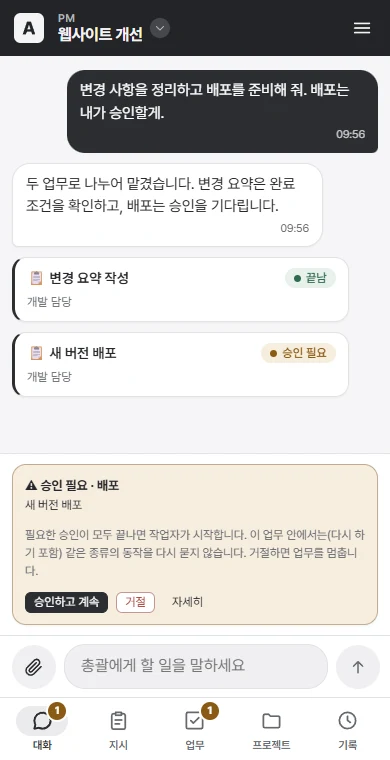
Summarize the changes and prepare deployment. I will approve the release.
I assigned two tasks. I will check the change summary against its completion criteria. Deployment will wait for your approval.
Checking completion criteriacheck_circleCompletion criteria passedchanges.md
verified_userApproved· Deployed
Deployment is done. The change summary is in changes.md.
The worker starts once every required approval is in. Rejecting stops the task.
Close an AI chat and the context scatters, “finished” has to be checked by hand, and risky commands have to be watched. The more you hand over, the more these three things eat your time.
When a conversation drops or a window closes, what you asked and how far it got are scattered. You spend time explaining the same thing again.
An AI can say something is finished when it isn't. In the end, checking falls to you.
Deploying, paying, deleting files and sending data out are hard to undo once they go wrong, which makes it hard to step away.
It remembers what you asked, verifies completion, asks you before risky actions and shows what was spent.
What you say is recorded as an instruction and what it's split into as tasks. If an AI conversation drops or the app restarts, it picks up from the record and doesn't start the same job twice without reason.
Fix the login error and get the deployment ready this week.
I split it into two tasks.
I'll deploy once you approve.
Finish conditions are set when a task is created. Even if the worker reports it's finished, the app checks each condition itself, and the task becomes done only when all pass. If one fails, the same worker is asked to continue.

Hard-to-undo actions such as deploying, paying, deleting files, sending data out or changing credentials go ahead only when you approve them. The approval card shows what, where and why, and even after you approve, rules such as limits and pauses are checked again.

Even away from your desk, connect from your phone to assign new work, tap approval cards to allow or reject, and see progress. The work runs on your PC at home or the office, and the phone connects only after you log in.
Set cost and usage limits per group of projects, and when a limit is reached it stops starting new work and tells you. You can also cap the cost of a single run per worker.
Cost figures come from the AI service and may differ from what you're actually billed. Limits are checked when new work starts, so to stop a single run already in progress, set a per-run cap.
Once a limit is reached, new work won't start and you'll be told.
ASTERON Agent doesn't build an AI of its own; it puts to work the AI tools you've installed and signed in to on your PC. Today that means Claude Code and Codex, and for each worker you set which tool it uses, which folder it works in and what it may do.
App captures use fictional demo data. Other diagrams illustrate features. Screens may change during development.
The AI plans and works, but what it may do is decided by the app. A worker's requests go through the app's rules, and every decision is recorded.
Pick one per project from research, development, operations, strict and free, then adjust internet access, command running, how far files can be edited and how risky actions are handled, item by item. The app follows your settings exactly and records them.
What you asked, what you approved or rejected and what a task was completed on are kept in the activity log and task timeline.
If the app restarts or a connection drops mid-task, it re-checks the state of the work that was running and carries on. Anything uncertain isn't restarted on its own; it asks you to check.
Please note: approval requests appear for risky actions the app recognizes, and the safeguards are only as strong as the permission group you choose. AI can make mistakes, so for important projects we recommend keeping a change history you can roll back (for example, git).
Contact our support team with questions about features and how to use the product.
Coming soon.This interaction is being connected in the next release.

ASTERON AssistantAI answers start to finish; only what truly needs a person goes to our team
AI answers can be wrong. Never enter passwords or payment details.